
TikTok Video Viewer — Browse Any Public Account's Videos
See a public account’s videos without logging in. Enter a username to open the Videos tab.
Public accounts only · No login · Nothing to install
Browse a public account’s videos and photo posts
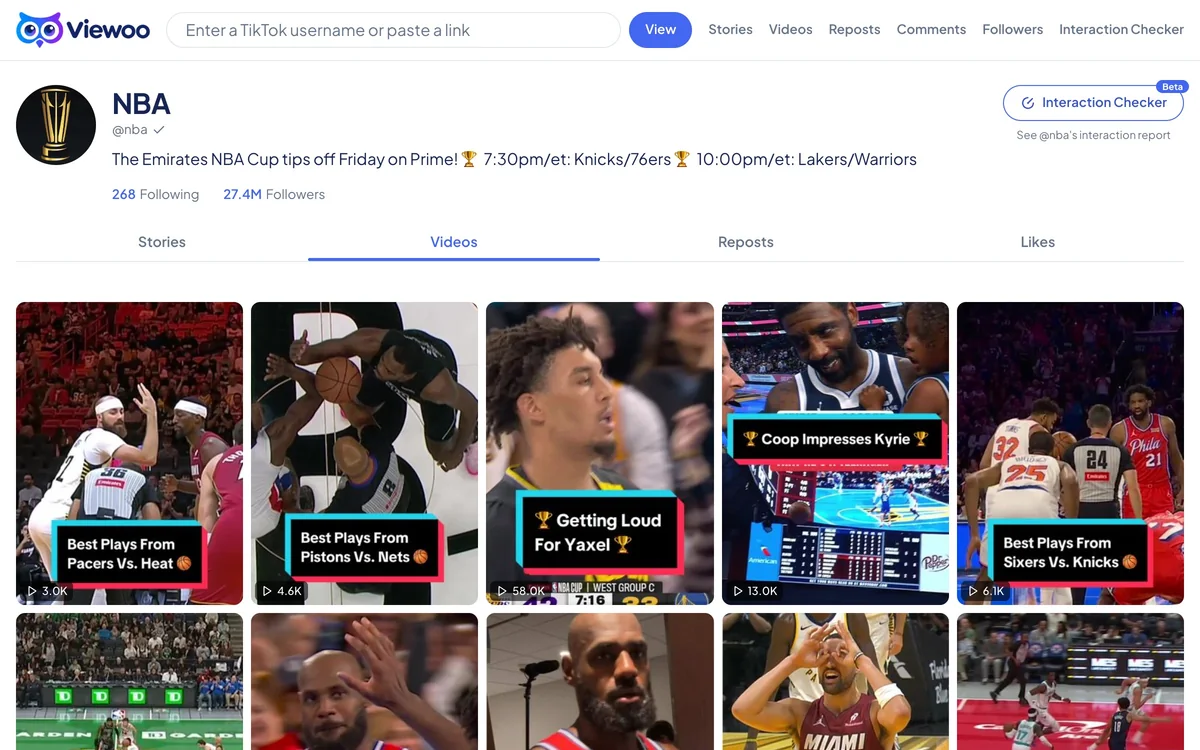
Sometimes you want the whole shelf, not one video. A public TikTok profile can hold years of posts, and opening each one in the app is a slow way to get a sense of what an account makes. Viewoo’s video viewer puts the account’s public videos and photo posts in one browsable view.
Enter a username or paste a profile link above. The profile opens on the Videos tab, where each card shows the post’s cover and play count. Open a video to watch it and read its caption and public counts — plays, likes, comments, and shares. Open a photo post to see its images. The comment section is available from the same page.
The list loads a page at a time. Use Load more to work back through older posts; if TikTok stops returning older items, the list ends there. Viewoo does not keep a separate archive, so it can only show posts that are still public at the time you look. Deleted videos, private videos, and private accounts are not available. Downloads and offline copies are not offered either.
No login, no install, and no TikTok password. Just a public account and a browser.
How it works
- 1
Enter a public username
Type the account name with or without the @, or paste its profile link. The Videos tab is the destination, so no video URL is needed.
- 2
Start on the Videos tab
Viewoo opens the public profile with Videos selected, showing the account’s posts as a grid rather than its stories or reposts.
- 3
Open a post or go further back
Select any video or photo post to see it in full. Use Load more to reach older posts that TikTok still returns.
What you can and can't see
What you can see
- Public videos and photo posts from the account
- Captions, play, like, comment and share counts
- The full video page with its comments and replies
- Older posts as you load more pages
What you can't see
- Private accounts or private videos
- Videos TikTok has deleted or no longer returns
- Downloads or offline copies
- Who watched a video
FAQ
How do I view someone's TikTok videos without an account?
Open this page, enter a public username, and Viewoo takes you to the account’s Videos tab. Every video opens on its own page with its caption and public counts, and you never need to sign in.
Can I see every video an account has posted?
The Videos tab loads one page at a time, and Load more fetches the next page. If TikTok stops returning older items, the list ends there; Viewoo doesn’t keep a separate archive.
Can I watch videos from a private account?
No. Private accounts and their videos aren’t public, so Viewoo shows a notice instead of the profile. The same applies to a video that has been deleted or made private.
Can the account tell that I watched its videos?
Viewoo never signs in as you, so there is no watch history to attach to an account. It fetches the public video list and counts; the creator is not notified when you browse or open a post.
Why are some videos missing?
A video may have been deleted, made private, or simply not returned by TikTok’s public list. Viewoo can only show what the public data exposes, so some older items may never appear.
Related tools
TikTok Story Viewer
Active stories from a public profile, opened as a grid of full-size thumbnails.
TikTok Repost Viewer
What an account has reposted, with the original author on every card.
TikTok Comment Viewer
The public comments and replies under a TikTok video.
TikTok Follower Viewer
The public followers list behind a TikTok account.
Related guide
Why a TikTok Video Stops Playing Mid-Way
A TikTok video can stop halfway because the media link expired, the post disappeared, or the connection dropped. Here is how to tell which one you are hitting.