
TikTok Repost Viewer — See What Anyone Reposted
Browse a public account's reposts without logging in. Enter a username to open the Reposts tab.
Public accounts only · No login · Nothing to install
See whose content an account amplifies
Reposts are the content a TikTok account chose to pass on. They sit apart from the videos someone posts themselves, which makes the Reposts tab useful when you want to see whose work an account is amplifying rather than only what it publishes.
That difference matters if you follow creators, compare brands, or keep an eye on a competitor. A profile's own feed shows what it made; its reposts show what it noticed. For a creator, the mix can hint at the peers and influences they watch. For a brand, it can show which campaigns, launches, or other voices it considered worth sharing. For research, it is a quick way to see the accounts and topics that sit around a public profile.
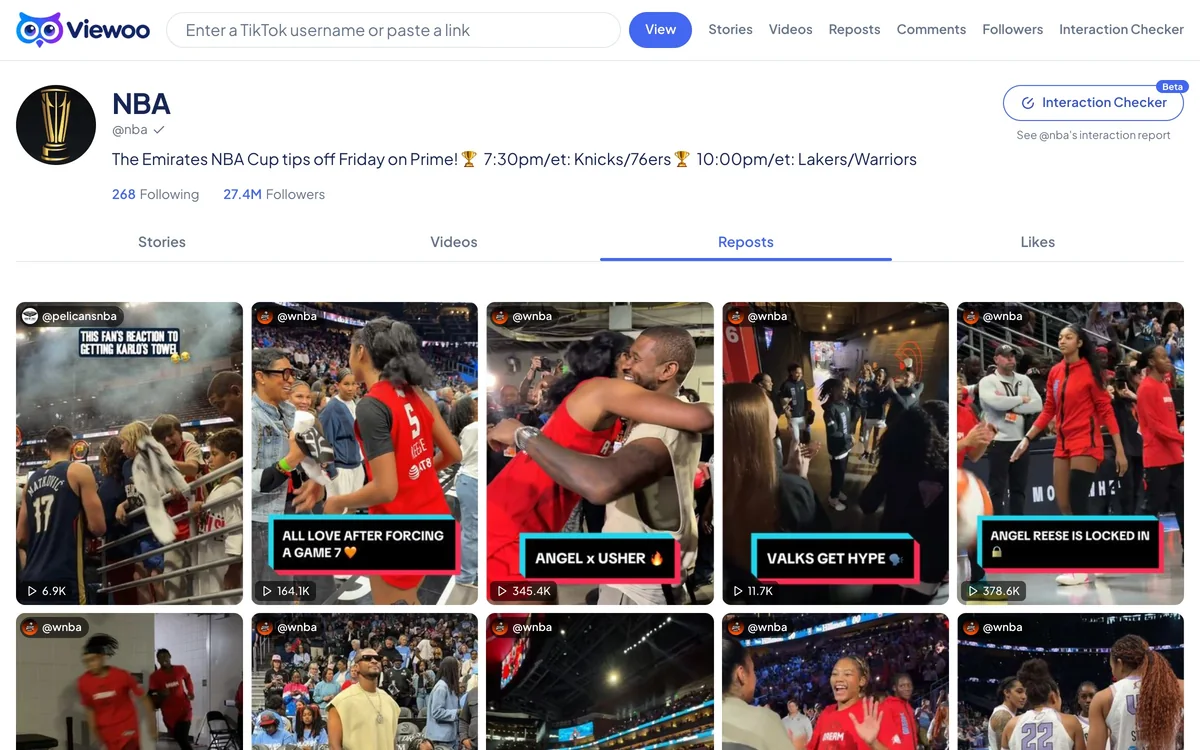
Viewoo opens the public Reposts tab and lists each reposted video or photo as a card. Every card names the original author, so the source stays visible instead of looking like the profile's own post. Play counts appear where TikTok exposes them, and you can open the original post to watch it. Older reposts load a page at a time; if TikTok stops returning them, the list ends there.
The account’s repost list must be public. Private accounts are not available, and no TikTok login is used.
How it works
- 1
Name the account you want to check
Enter the public TikTok username, with or without the @. A full profile URL also works.
- 2
Land on its Reposts tab
Viewoo reads the public profile and selects Reposts for you, so the page opens on shared content instead of the account’s own videos.
- 3
Follow the shares back to their source
Each card names the original author and shows the play count. Open a card to watch the original post; use Load more for older reposts.
What you can and can't see
What you can see
- Public videos and photo posts the account has reposted
- The original author of every repost
- Play counts and a link to the original post
- Older reposts as you load more pages
What you can't see
- Private accounts or private reposts
- Reposts of videos that were deleted or made private
- An account’s complete repost history if TikTok stops returning it
- Who viewed the reposts
FAQ
How do I see someone's reposts on TikTok without an account?
Enter a public username above. Viewoo opens the account’s profile with the Reposts tab selected, so you can browse the reposted videos and photos without signing in.
Can I see older reposts?
The tab loads a page at a time; use Load more to go further back. If TikTok stops returning older items, the list ends there — Viewoo can’t fetch what the public data doesn’t expose.
Can I view reposts from a private account?
No. Private accounts and their reposts aren’t public, so Viewoo shows a private-account notice instead.
Will the account owner know I looked at their reposts?
There is no notification path in Viewoo. The page does not sign in, follow, like, or send anything to the account, and the repost list is read from public data, so the owner sees no view from you.
Why are some reposts missing?
A repost can disappear if the original video was deleted or made private, or if TikTok doesn’t return every item in the list. Viewoo only shows reposts that are still public.
Related tools
TikTok Story Viewer
Active stories from a public profile, opened as a grid of full-size thumbnails.
TikTok Video Viewer
The recent videos and photo posts on a public profile, with captions and counts.
TikTok Comment Viewer
The public comments and replies under a TikTok video.
TikTok Follower Viewer
The public followers list behind a TikTok account.
Related guide
How to View a TikTok Profile Without Logging In
A public TikTok profile can be opened without an account, though TikTok may still push you to sign in. Here is what you can see, and what stays out of reach.